Cursor插件市场打不开怎么办? Cursor插件市场无法打开或加载缓慢解决办法
作者:本站作者 人气:问题描述
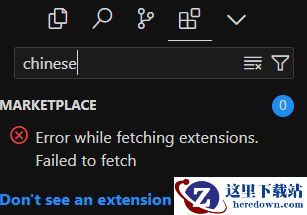
在Cursor商店中,无法下载所需的插件,或者搜索插件时需要等待很长时间。
error while fetching extensions.failed to fetch
原因分析
Cursor默认使用的插件市场并非VS Code的插件市场,且由于国内网络环境的限制,可能无法正常访问。
解决方案
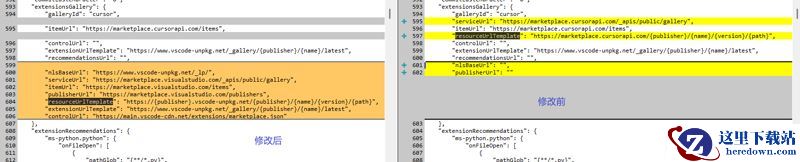
打开cursor安装目录下的resources\app\product.json文件,修改extensionsGallery中属性resourceUrlTemplate、serviceUrl值,修改后值清单如下:
打开Cursor安装目录下的 resources\app\product.json 文件。修改文件中 extensionsGallery 的配置(将下文的内容复制并覆盖原本内容)。修改插件市场的地址后,重启Cursor。原始配置:
"extensionsGallery": {
"galleryId": "cursor",
"serviceUrl": "https://marketplace.cursorapi.com/_apis/public/gallery",
"itemUrl": "https://marketplace.cursorapi.com/items",
"resourceUrlTemplate": "https://marketplace.cursorapi.com/{publisher}/{name}/{version}/{path}",
"controlUrl": "",
"extensionUrlTemplate": "https://www.vscode-unpkg.net/_gallery/{publisher}/{name}/latest",
"recommendationsUrl": "",
"nlsBaseUrl": "",
"publisherUrl": ""
},
修改后的配置:
"extensionsGallery": {
"galleryId": "cursor",
"serviceUrl": "https://marketplace.visualstudio.com/_apis/public/gallery",
"itemUrl": "https://marketplace.visualstudio.com/items",
"resourceUrlTemplate": "https://{publisher}.vscode-unpkg.net/{publisher}/{name}/{version}/{path}",
"controlUrl": "",
"extensionUrlTemplate": "https://www.vscode-unpkg.net/_gallery/{publisher}/{name}/latest",
"recommendationsUrl": "",
"nlsBaseUrl": "https://www.vscode-unpkg.net/_lp/",
"publisherUrl": "https://marketplace.visualstudio.com/publishers"
},
修改对比:
推荐阅读:Cursor登录按钮点击没反应怎么办? Cursor无法登录的解决方案
加载全部内容
 龙之谷世界
龙之谷世界 家园攻防战
家园攻防战 武侠历险记
武侠历险记 修仙奇谭
修仙奇谭 新仙魔九界
新仙魔九界 弓箭传说2
弓箭传说2 黎明飞驰
黎明飞驰 时空猎人
时空猎人